Anyone who has ever had an iPhone become unusable after a failed software update knows how frustrating the experience can be. In many cases, the only solution has been to connect the device to a computer and restore iOS using Finder or Apple’s recovery tools.
That may soon be a thing of the past.
With iOS 27, Apple is introducing a new recovery mode that works directly on the iPhone itself, making it much easier to recover a device when something goes wrong.
Recovery happens directly on the iPhone
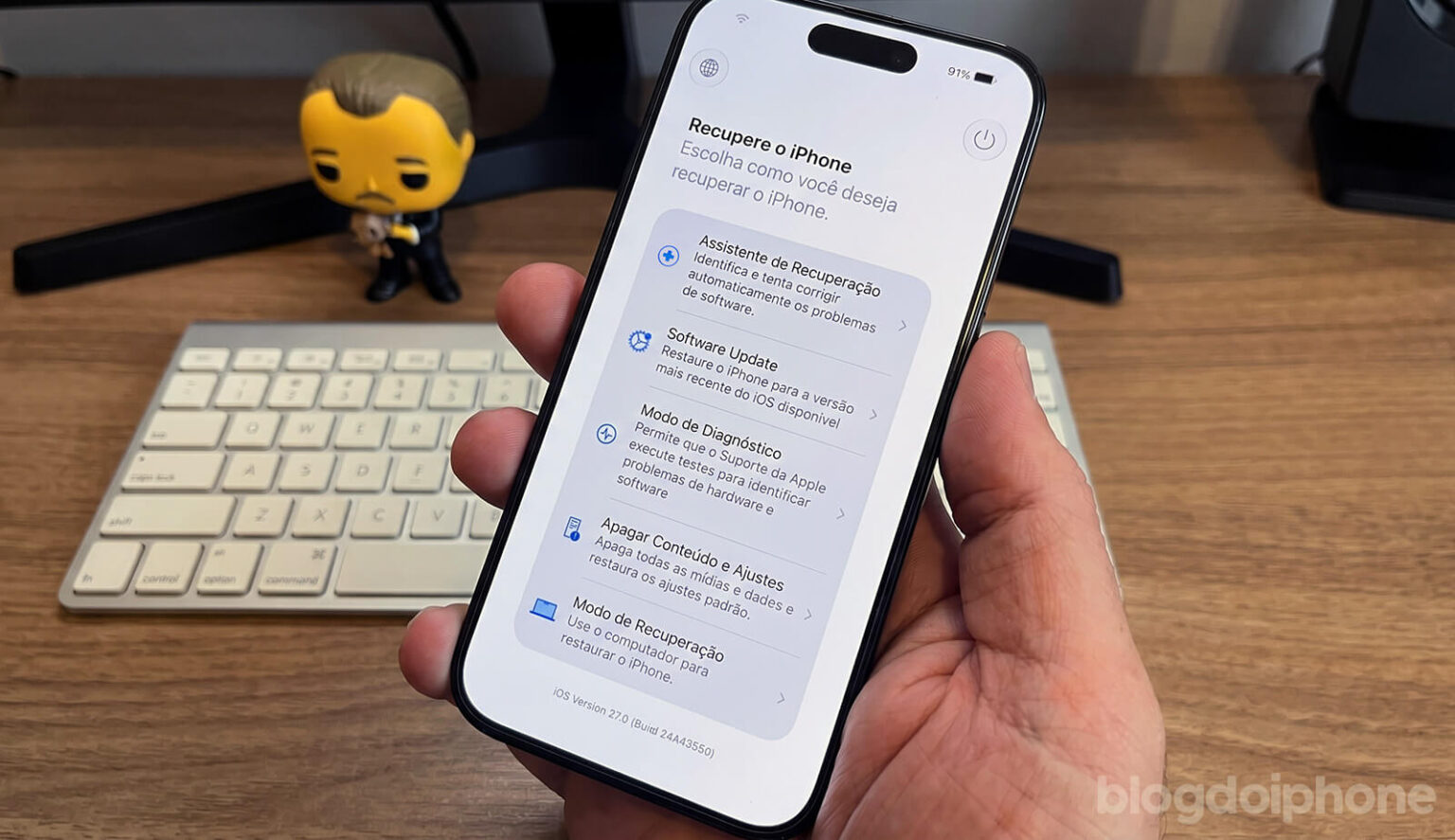
The feature was first discovered in the initial iOS 27 beta and creates a dedicated recovery environment that operates independently from the main operating system.
If an iPhone encounters a problem that prevents iOS from loading normally, it can boot into this special recovery mode instead.
From there, users can access tools to diagnose issues, reinstall system components, and attempt to restore the device to working order.
The most significant change is that all of this can be done without connecting the iPhone to a Mac or PC.
Activating the feature is also much simpler than the complicated button combinations traditionally required to enter DFU mode or Recovery Mode.
Users simply power off the device and hold the Side button while it starts up. After a few moments, the iPhone enters the recovery environment and displays the available repair options.
Because the feature is still in beta testing, Apple could make changes before the final release of iOS 27.
No more searching for a computer
For years, one of the biggest limitations of iPhone recovery has been the requirement for a computer.
Not everyone owns a Mac, and many people no longer have regular access to a desktop or laptop when their phone experiences a serious problem.
While traveling or during emergencies, this dependency could turn a relatively simple software issue into a major inconvenience.
With this new system, Apple appears to be recognizing a reality that has become increasingly common: for many users, their smartphone is their primary, and sometimes only, computing device.
The system can download repair files over the internet
Another important aspect of the new recovery mode is its ability to connect to previously known Wi-Fi networks.
This allows the iPhone to download software updates, repair packages, and other system components needed to restore functionality without requiring cables or external hardware.
In practice, the experience becomes much closer to the recovery environment already available on modern Apple Silicon Macs, where repair tools are built directly into the device.
Tools for different types of problems
The new recovery environment offers several options depending on the issue being addressed.
Available tools include software updates, diagnostics, complete system resets, and advanced recovery procedures.
The traditional Recovery Mode remains available for users who prefer to connect their iPhone to a Mac in specific situations.
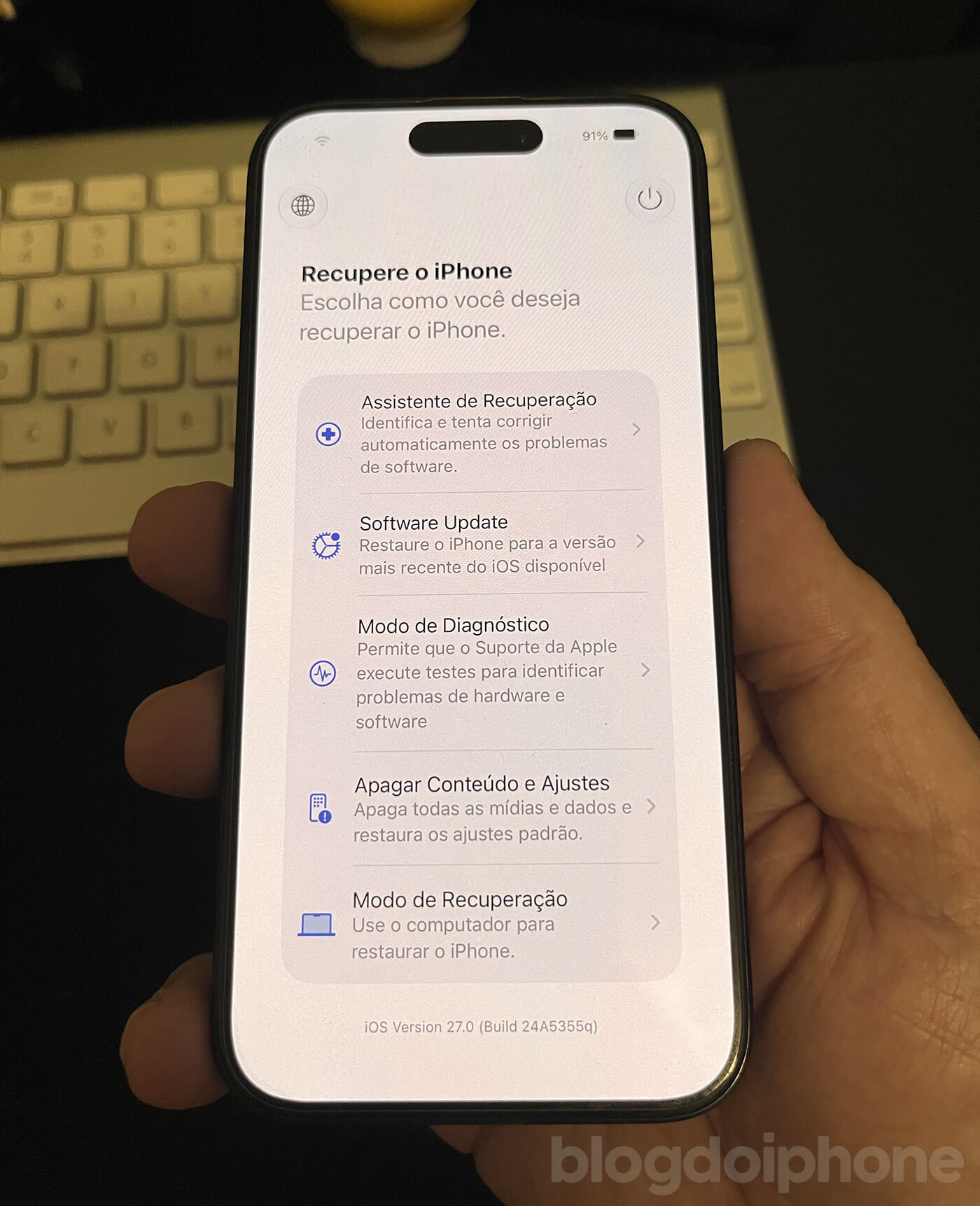
Apple is not removing the existing recovery methods. Instead, it is adding a simpler and more accessible alternative for the majority of software-related problems.
One of the most useful iOS 27 features
While iOS 27 was introduced with a strong focus on artificial intelligence, personalization, and visual changes, this new recovery mode could end up being one of the update’s most practical additions.
After all, it addresses a real problem faced by millions of iPhone users worldwide: restoring a malfunctioning device without needing a second piece of hardware.
If Apple keeps the feature in the final release, recovering an iPhone could become simpler, faster, and more accessible than ever before.