When Apple introduced the Clean Up tool in the Photos app, the goal was straightforward: let anyone remove unwanted objects from a photo with just a few taps.
The feature worked well for simple edits, but the results were not always convincing. In many cases, the area that had been removed ended up with artificial textures, distorted details, or obvious signs that the image had been edited.
That appears to be changing significantly in iOS 27.
Early testing of the new software shows that Apple has substantially improved the technology behind Clean Up, making edits look far more natural and much harder to detect.
Same feature, dramatically better results
At first glance, the Clean Up tool works exactly as before.
Users simply select a person, object, or element they want removed from a photo, and Apple Intelligence automatically fills in the empty space.
The real improvement comes from the quality of that reconstruction.
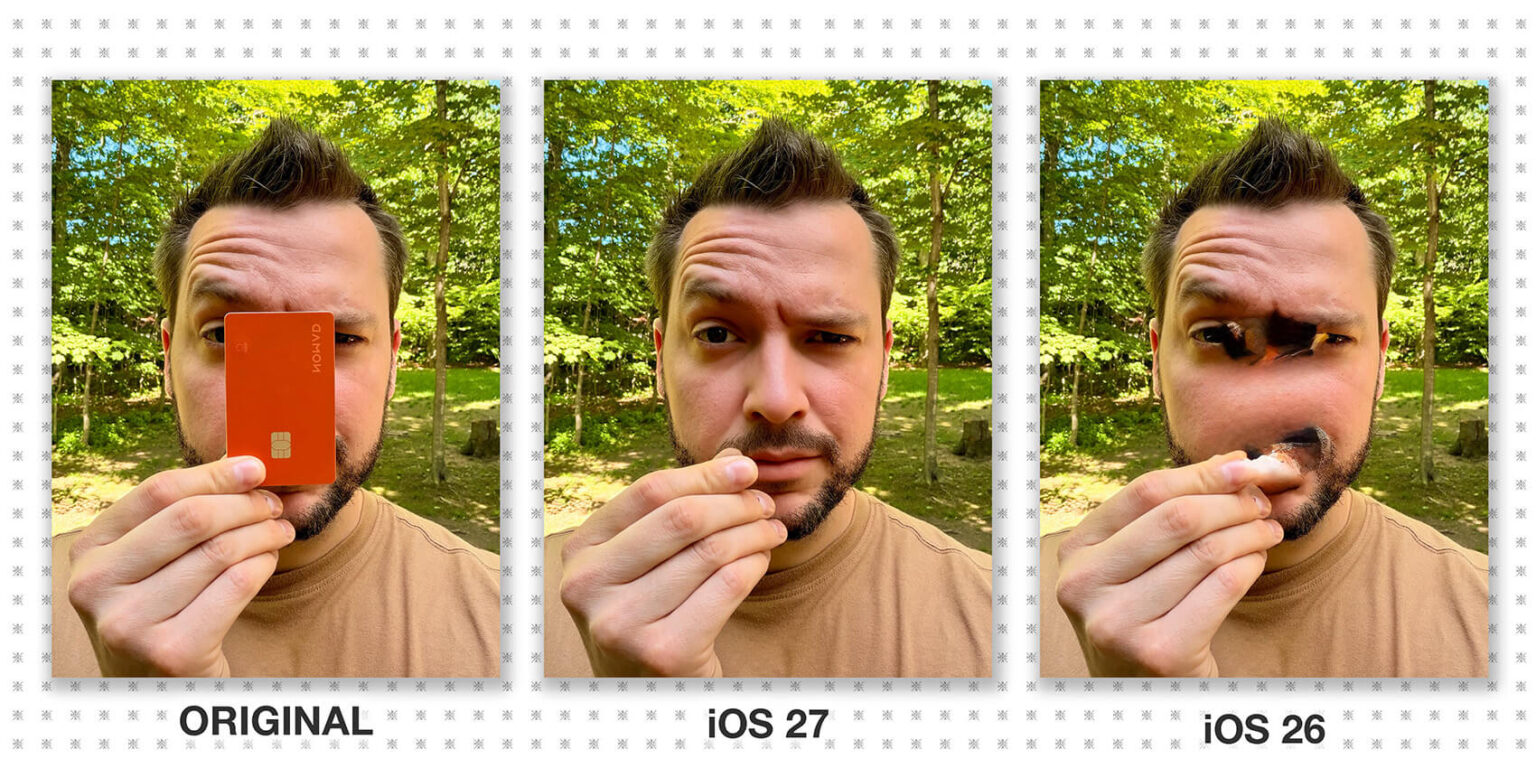
Side-by-side comparisons using the same images on iOS 26 and iOS 27 show that the newer version is much better at rebuilding complex areas of a photo.
Textures, shadows, repeating patterns, and background details are recreated more accurately, significantly reducing the visual artifacts that often appeared after editing in previous versions.
iOS 27 feels like a big step up from iOS 26.
One standout feature is AI photo editing.
Now, if a photo turns out bad, I can finally say,
“Don’t blame me. The AI hadn’t started its shift yet.” https://t.co/Lib4IaB86B pic.twitter.com/HvhleQThD8
— TeslaZoa (@TeslaZoa) June 9, 2026Large objects are no longer a challenge
One of the biggest weaknesses of the previous version became obvious whenever users tried to remove larger subjects from an image.
Depending on the background, the result could look noticeably artificial, often requiring multiple attempts to achieve something acceptable.
With iOS 27, Apple appears to have addressed exactly that problem.
Early tests suggest that larger objects can now be removed with much more consistent results, even in scenes filled with vegetation, detailed textures, or repeating patterns.
That makes the feature far more practical for everyday photo corrections without requiring users to turn to specialized editing apps.
🔥 The new Clean Up tool in iOS 27 Photos app is a million times better! Absolute game changer 📸
⚠️ Note: Currently in Developer Beta, official release later this year!#iOS27 #CleanUp #Apple #TechNews pic.twitter.com/Sg3k23SUHh
— it's Amar Tech (@itsAmartech) June 9, 2026Apple Intelligence keeps getting smarter
The evolution of Clean Up also highlights an interesting trend in Apple’s AI strategy.
Much of the attention during WWDC 2026 focused on the new Siri and the latest Apple Intelligence capabilities. But Apple is also using its AI models to improve tools that millions of people already use every day.
In this case, Apple did not introduce a brand-new feature. Instead, it made an existing one significantly better.
Those kinds of improvements often end up having a bigger impact on the daily iPhone experience than headline-grabbing announcements.
Photos receives several AI-powered upgrades
The Photos app is one of the biggest beneficiaries of Apple Intelligence enhancements in iOS 27.
In addition to the improved Clean Up tool, Apple has introduced new editing capabilities, including intelligent reframing tools and automatic adjustments designed to improve image composition.
The goal is to help everyday users perform increasingly sophisticated edits without learning advanced photography techniques or installing third-party apps.
An upgrade millions of users will appreciate
Not every new feature in iOS 27 will become part of users’ daily routines. Some improvements are designed for specific situations or require people to change the way they use their devices.
Clean Up is different.
Anyone who takes photos regularly has probably captured unwanted people, signs, power lines, vehicles, or other distractions in the background.
The better Apple becomes at removing those elements, the more valuable the feature becomes.
If the results seen in early testing carry over to the final release, Clean Up could end up being one of the most practical and widely used improvements in iOS 27, even if it receives far less attention than some of the flashier Apple Intelligence announcements.