Learn how to find out the country of origin of your iPhone.
If you’re thinking about buying an iPhone or are interested in the different available iPhone models, you should know that not all iPhones are the same.
Even if they are purchased in a local store, during a trip abroad, or used, the origin of the device can vary.
For example, some iPhone models in China have two slots for physical SIM cards, while in the United States, the latest versions have none.
➽ iPhone 14 sold in the US does not come with a SIM card slot
➽ How to have a (free) US dollar account to buy iPhone in the US
Therefore, if for some reason you want to know the country of origin of an iPhone, know that there is a simple and effective method to find out, directly in your device’s system.
We have already talked here about how to check if your iPhone is new, refurbished, or customized. And the way to discover the origin of your device is practically the same.
The secret lies in a specific code that can be found in the device settings, indicating the country for which the device was originally intended.
Here is the step-by-step guide to find out the “iPhone origin country”:
- Step 1: Open the System Settings.
- Step 2: Open the General menu.
- Step 3: Tap on the About option.
- Step 4: Look for the model code of your device on the screen.
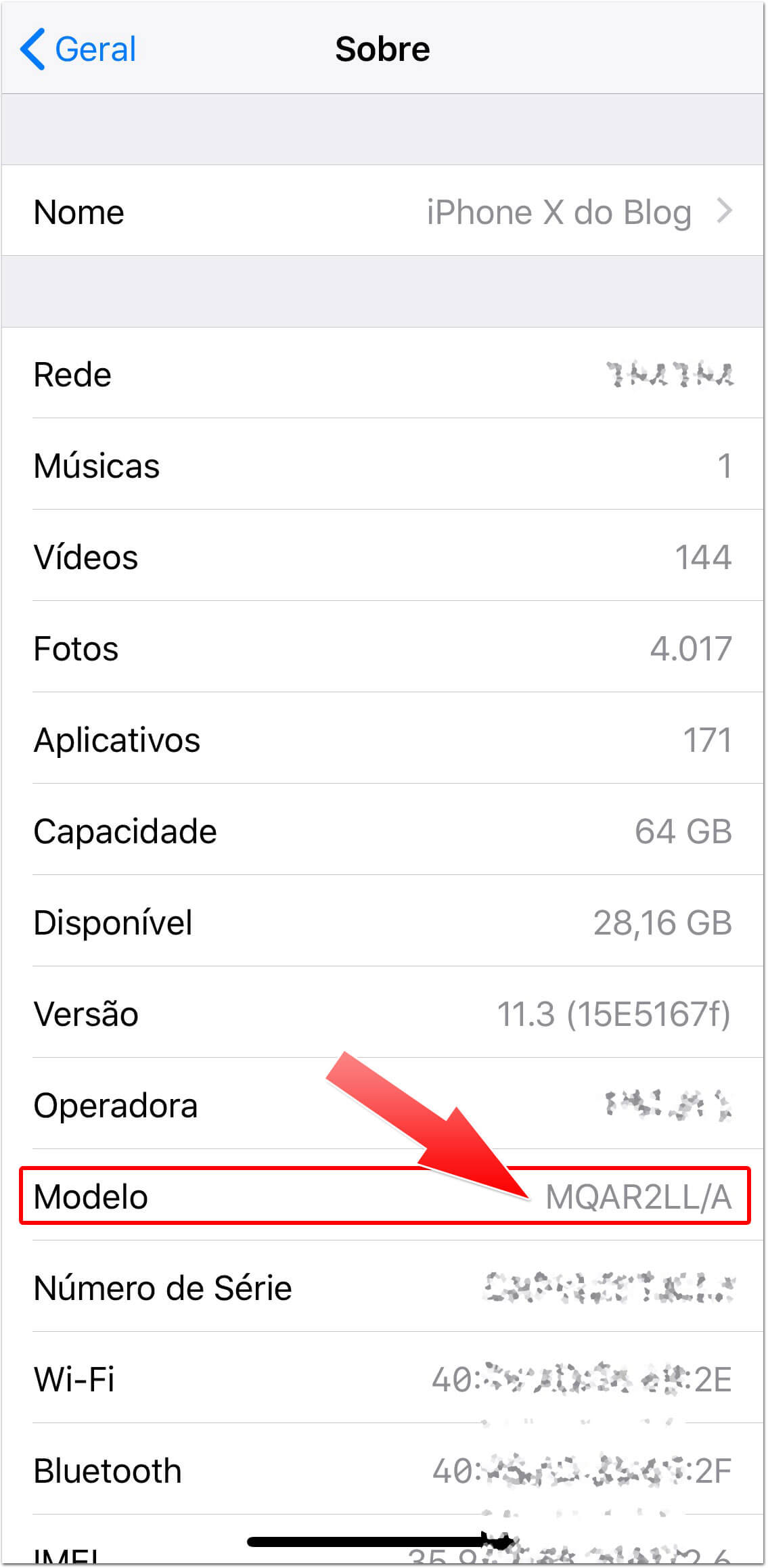
This code, embedded in each device, reveals the country of origin of the iPhone. The letters immediately before the slash in the code are the key to discovering this.
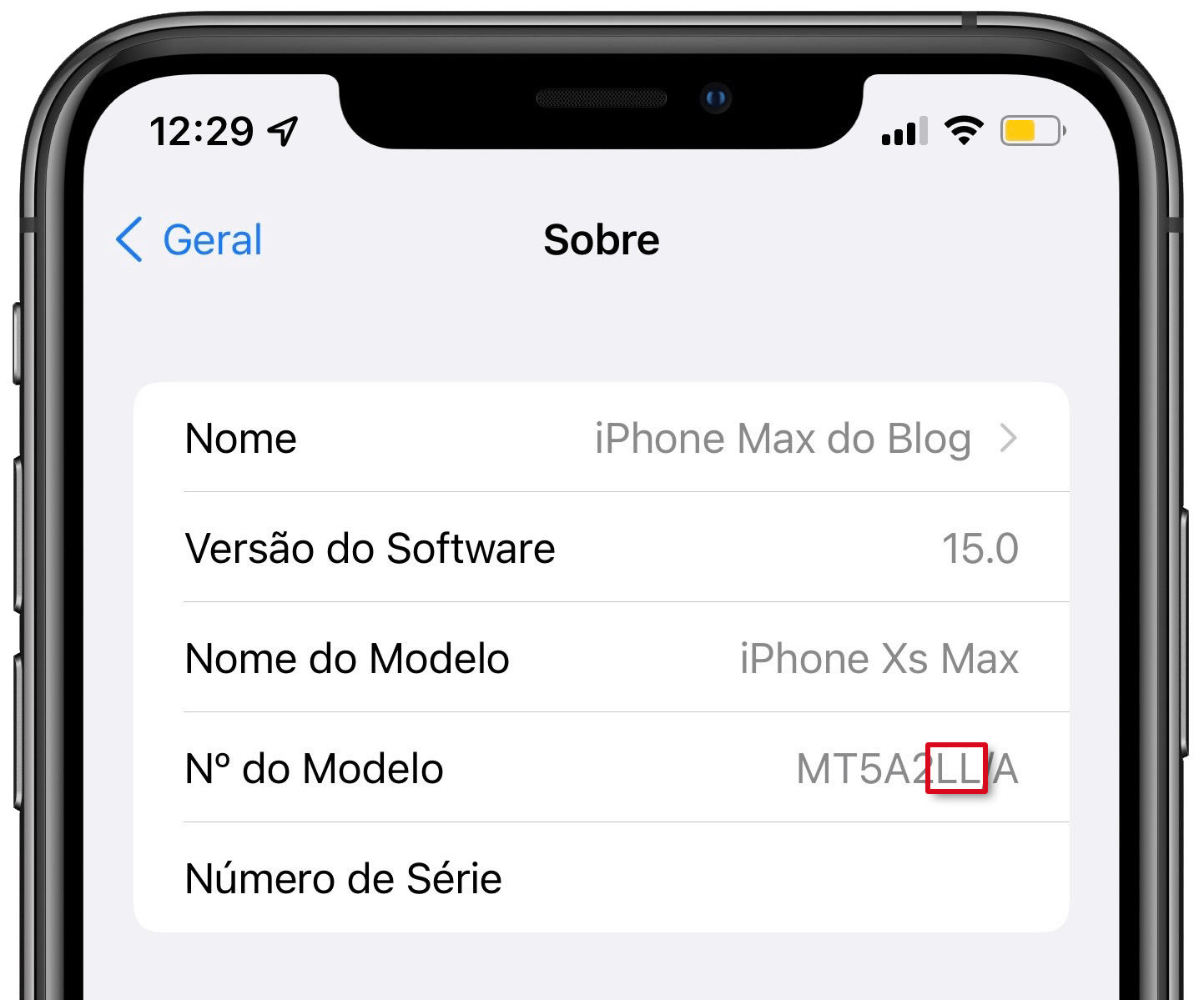
Regardless of where it is manufactured, each country receives a specific model for it. We have even taught here how to find out when an iPhone is manufactured in Brazil:
The same code can also indicate the manufacturing country of the iPhone. Check the set of letters that appear before the slash and after the last number to determine the origin of your iPhone.
Below you can see the complete list of these codes. For example, LL is the model sold in the United States, PO in Portugal. Check it out:
| Code | Country |
|---|---|
| A | Canada |
| AB | Egypt / Jordan / Saudi Arabia / United Arab Emirates |
| AA | United Arab Emirates |
| AE | United Arab Emirates |
| B | Ireland / United Kingdom / also used for some replacement units |
| BG | Bulgaria |
| BR | Brazil (assembled in Brazil) |
| BZ | Brazil (assembled in China) |
| BT | United Kingdom |
| C | Canada |
| CL | Canada |
| CH | China |
| CI | Paraguay |
| CM | Croatia / Hungary |
| CR | Croatia |
| CS | Slovakia / Czech Republic |
| CN | Slovakia |
| CZ | Czech Republic |
| D, DM | Germany |
| DN | Austria / Germany / Netherlands |
| E | Mexico |
| EE | Estonia |
| EL | Estonia / Latvia |
| ER | Ireland |
| F | France |
| FB | France / Luxembourg |
| FD | Austria / Liechtenstein / Switzerland |
| GB | Greece |
| GH | Hungary |
| GP | Portugal |
| GR | Greece |
| HB | Israel |
| HC | Hungary / Bulgaria |
| HN | India |
| ID | Indonesia |
| IP | Italy |
| J, JP | Japan |
| K | Sweden |
| KH | South Korea / China |
| KN | Norway / Denmark |
| KS | Finland / Sweden |
| LA | Colombia / Ecuador / El Salvador / Guatemala / Honduras / Peru / Barbados / Puerto Rico / Nicaragua / Dominican Republic |
| LE | Argentina |
| LL | USA / also used for some replacement units |
| LP | Poland |
| LT | Lithuania |
| LV | Latvia |
| LZ | Chile / Paraguay / Uruguay |
| MG | Hungary |
| MO | Macau, Hong Kong |
| MY | Malaysia |
| NF | Belgium / France / Luxembourg |
| PL | Poland / Finland |
| PL, PM | Poland |
| PO | Portugal |
| PP | Philippines |
| PY | Spain |
| QB | Russia |
| QN | Denmark / Iceland / Norway / Sweden |
| QL | Italy / Portugal / Spain |
| RO | Romania |
| RS, RP, RU | Russia |
| RR | Moldova |
| RM | Kazakhstan / Russia |
| RK | Kazakhstan |
| SE | Serbia |
| SL | Slovakia |
| SO | South Africa |
| SU | Ukraine |
| T | Italy |
| TA | Taiwan |
| TH | Thailand |
| TU | Turkey |
| TY | Italy |
| VN | Vietnam |
| X | Australia / New Zealand |
| Y | Spain |
| ZA | Singapore |
| ZD | Austria / Belgium / France / Germany / Luxembourg / Monaco / Netherlands / Switzerland |
| ZG | Denmark |
| ZO | United Kingdom |
| ZP | Hong Kong / Macau |
| ZQ | Jamaica |
Just see which set of letters is before the slash and after the last number to determine the country of origin of your iPhone.
This information can be especially useful when you’re considering buying a used or imported iPhone. Knowing the device’s origin can help you better understand the specifications and features it may have.